Trustlines on XRPL AlphaNet
In the XRP Ledger ecosystem, trustlines are one of the most important concepts — especially for anyone working with issued tokens (IOUs). If you want to hold tokens on XRPL AlphaNet, you must first create a trustline. In this guide, we’ll explain what a trustline is, why trustlines matter, and how to add it in just a few clicks using Bithomp.
What Is a Trustline on XRP Ledger ?
A trustline on the XRP Ledger is a connection between two accounts that specifies the maximum amount of an issued asset (IOU) one account is willing to hold from a particular issuer.
- A trustline tells the ledger two things:
- Which issuer you trust to hold IOUs from
- How much of that issued token you are willing to hold
Trustlines protect you by preventing anyone from sending you ‘spam’ tokens. Without an approved trustline, issued tokens cannot appear on your balance.
Why Trustlines Are Important
- Trustlines help maintain:
- Control — you define limits for how much of a token you’re willing to accept.
- Transparency — you always know which assets your wallet interacts with.
- Stability — they prevent “token flooding” and wallet spam common in other networks.
Setting Up XRP Ledger Trustlines
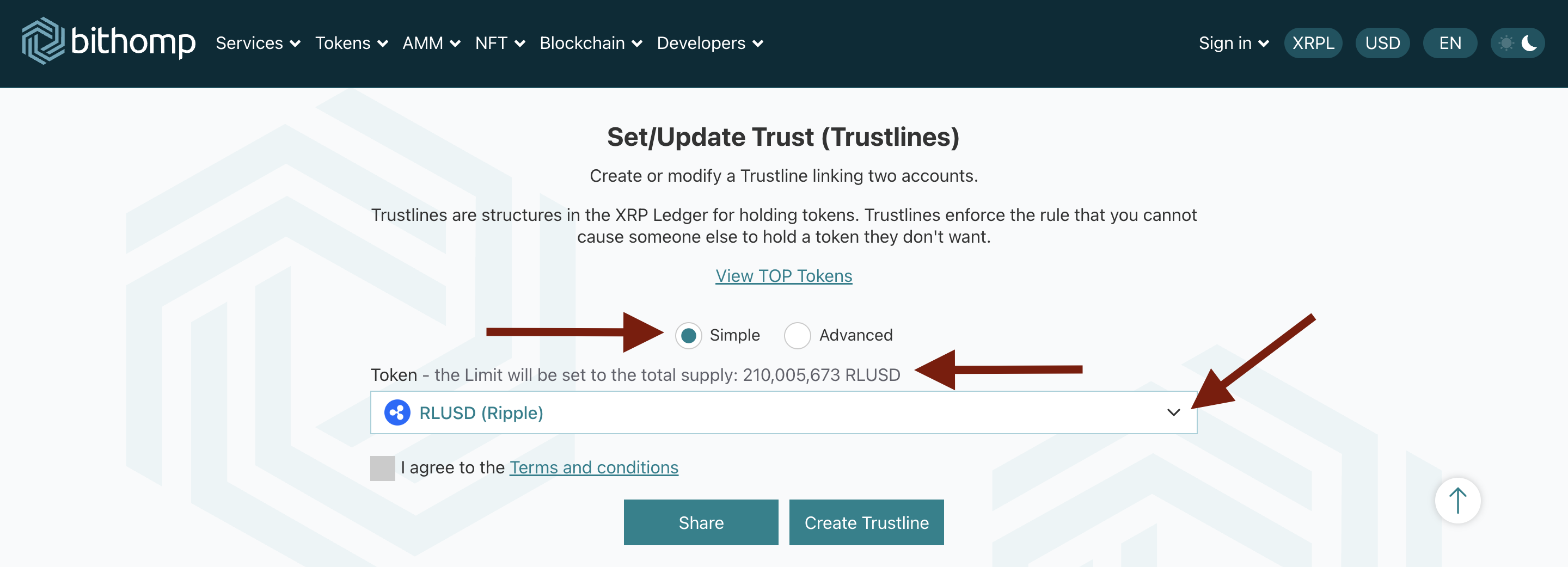
In this simple mode you just need to choose the required token from the drop-down list and sign the transaction. The Limit will be set to the total supply.
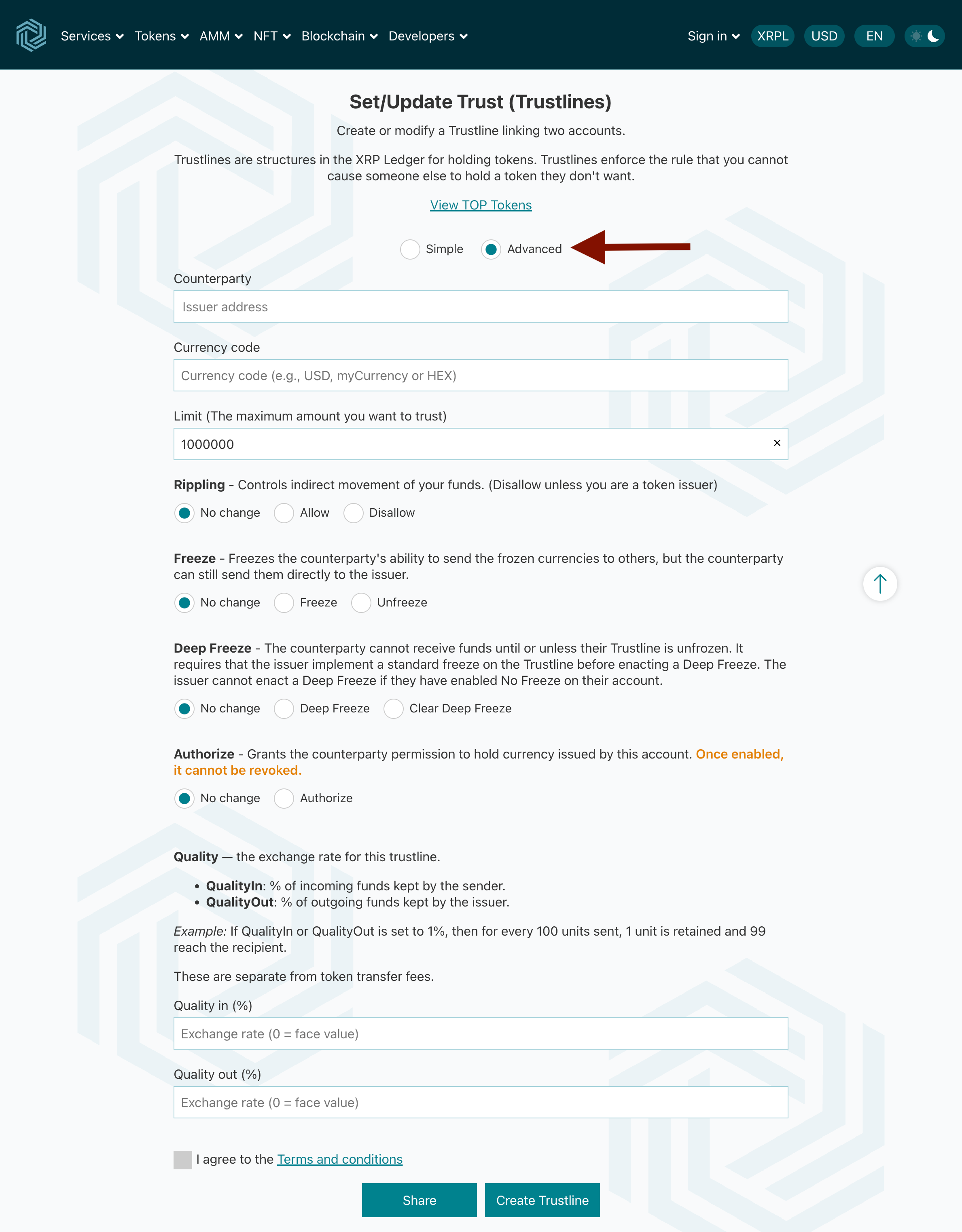
In Advanced Mode, you can customize your trustline and even create a trustline for a token that doesn’t exist yet. This is useful if you're willing to issue a new token on XRP Ledger.
If you're planning to launch your own token, you can follow our step-by-step guide on how to issue a token on XRPL AlphaNet.
Trustline Flags Explained
When setting a trustline through Advanced Mode, you may need to adjust specific trustline flags or parameters. These flags control how your issued tokens behave and how other accounts can interact with them. Here’s a clear explanation of each option:
Rippling
Controls the indirect movement of funds across trustlines.
Recommended: Disable unless you are a token issuer managing liquidity or advanced routing.
When disabled, your balance cannot be used to “ripple through” to facilitate exchanges between other trustlines.
Freeze
Prevents the counterparty from sending the frozen currency to other users, but they can still return the tokens to the issuer.
Useful for controlling misuse or suspicious activity.
Can be reversed.
Deep Freeze
A stronger version of Freeze.
The counterparty cannot receive any additional funds until the trustline is unfrozen.
Requires a standard Freeze to be applied first.
Cannot be used if the issuer has enabled No Freeze on their account.
Authorize
Grants explicit permission for a counterparty to hold the currency issued by your account.
Required for authorized tokens, often used by financial institutions or compliance-focused projects.
Once authorization is enabled on a trustline, it cannot be revoked.
Quality Settings (QualityIn and QualityOut)
Quality settings define the exchange rate for a trustline and determine how much of the asset is transferred during incoming or outgoing transactions.
QualityIn
Percentage of incoming funds retained by the sender.
Example: If QualityIn is set to 1%, then when someone sends you 100 units, 1 unit is kept and you receive 99.
QualityOut
Percentage of outgoing funds kept by the issuer.
Example: If QualityOut is set to 1%, sending 100 units results in the recipient receiving 99, while 1 unit is retained.
These are not token transfer fees — they are part of XRP Ledger's built-in trustline quality mechanics and affect exchange rates rather than applying a fee to the transaction. A default value of 0 means the token is exchanged at face value, with no percentage retained.
Share Button — Send Ready-to-Use Trustline Links
Share Trustlines Easily
If you’re a token issuer, community manager, developer, or simply helping someone set up a wallet, the Share button will save you time.
With one click, you can:
- Generate a link to a prefilled trustline,
- Share it with a user,
- And they’ll open a ready-to-submit trustline form instantly.
No manual typing, no mistakes — just fast and accurate onboarding.
Why Use Bithomp for Trustlines?
- Fast trustline creation for any token
- Sign transactions with Ledger, Xaman, Gem Wallet, MetaMask, and more
- Beginner-friendly interface
- Advanced settings for experienced users
- Easy sharing with auto-generated links
Bithomp offers the fastest and most user-friendly way to add trustlines on XRPL AlphaNet — from simple mode to advanced flag settings and shareable trustline links. Whether you're a beginner or an experienced issuer, Bithomp gives you all the tools you need to manage trustlines securely.
FAQ
Do I need a trustline to hold any XRPL AlphaNet token on my account?
Yes. Without a trustline, your wallet can't hold any incoming issued token (IOU).
Can I remove or edit a trustline later?
Yes.
- You can update the trustline limit or enable/disable flags at any time.
- To completely remove a trustline, the balance must be 0 and the settings reset to default.
- If the balance is not 0, you can still “burn” remaining tokens by sending them back to the issuer. Once the balance reaches 0 and the settings are reset, the trustline can be removed.
- When a trustline is removed, the reserved XRP is released back to your available balance.
Does creating a trustline cost XRP?
Yes.
- Each trustline requires an owner reserve of 0.2 XRP.
- This amount is not spent — it is simply locked while the trustline exists.
- For new accounts, XRPL provides a “trustline credit”: your first two trustlines do not immediately require additional XRP from your balance.
- Note: this is a credit, not a free gift — when you create a third trustline, the reserve must be paid upfront.
- When you delete a trustline, the 0.2 XRP reserve is released back to your usable balance.